Quick Start
1.1 Obtaining a PAYDAO Card
Currently, the PAYDAO Card is provided as a bundle with the PAYDAO POS Terminal and is not available for individual purchase. Please apply for it at merchants that support PAYDAO.
1.2 Activation Process
Step 1: Card Activation
- Visit a PAYDAO-supported merchant and have the merchant complete on-site activation using the PAYDAO POS Terminal.
- A payment account will be created immediately upon activation and can be used right away with no approval waiting period.
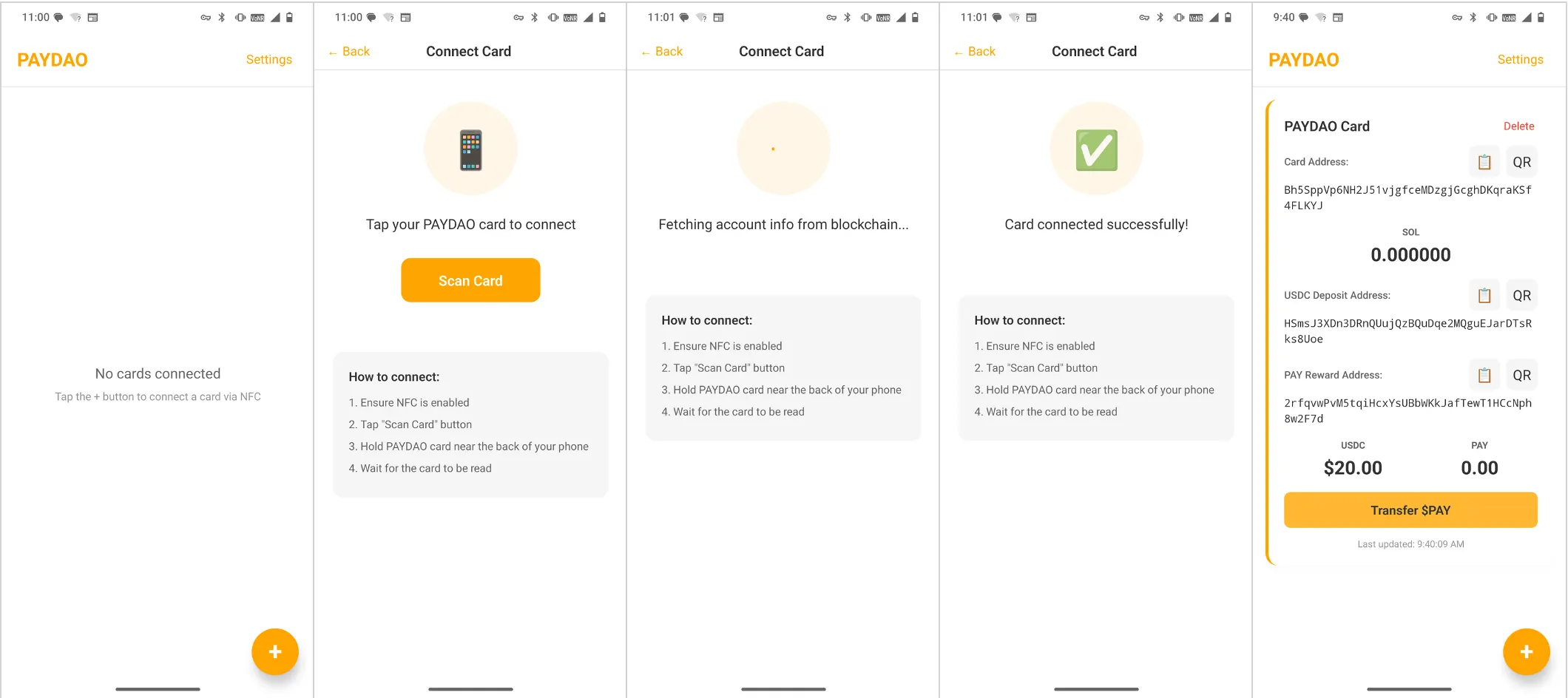
Step 2: Link to the App
- Download and install the PAYDAO App (available on the iOS App Store and Google Play).
- Open the App and tap the "+" icon in the bottom right corner.
- Tap Scan Card, place the card on the phone’s NFC area and hold it steady for a few seconds without moving it.
Once binding is complete, relevant card information will be displayed.
1.3 Top-up
- Copy the USDC Deposit Address.
- Transfer USDC to this address using any Web3 wallet that supports the Solana Network.
- After the top-up is completed, the USDC balance will be displayed in the App.
Note:
*Multiple PAYDAO Cards can be linked to the App simultaneously.
*Stablecoins deposited by users can only be used for payments and do not support withdrawal functions.